Mermaid++
Bunlong Heng
March 17, 2026
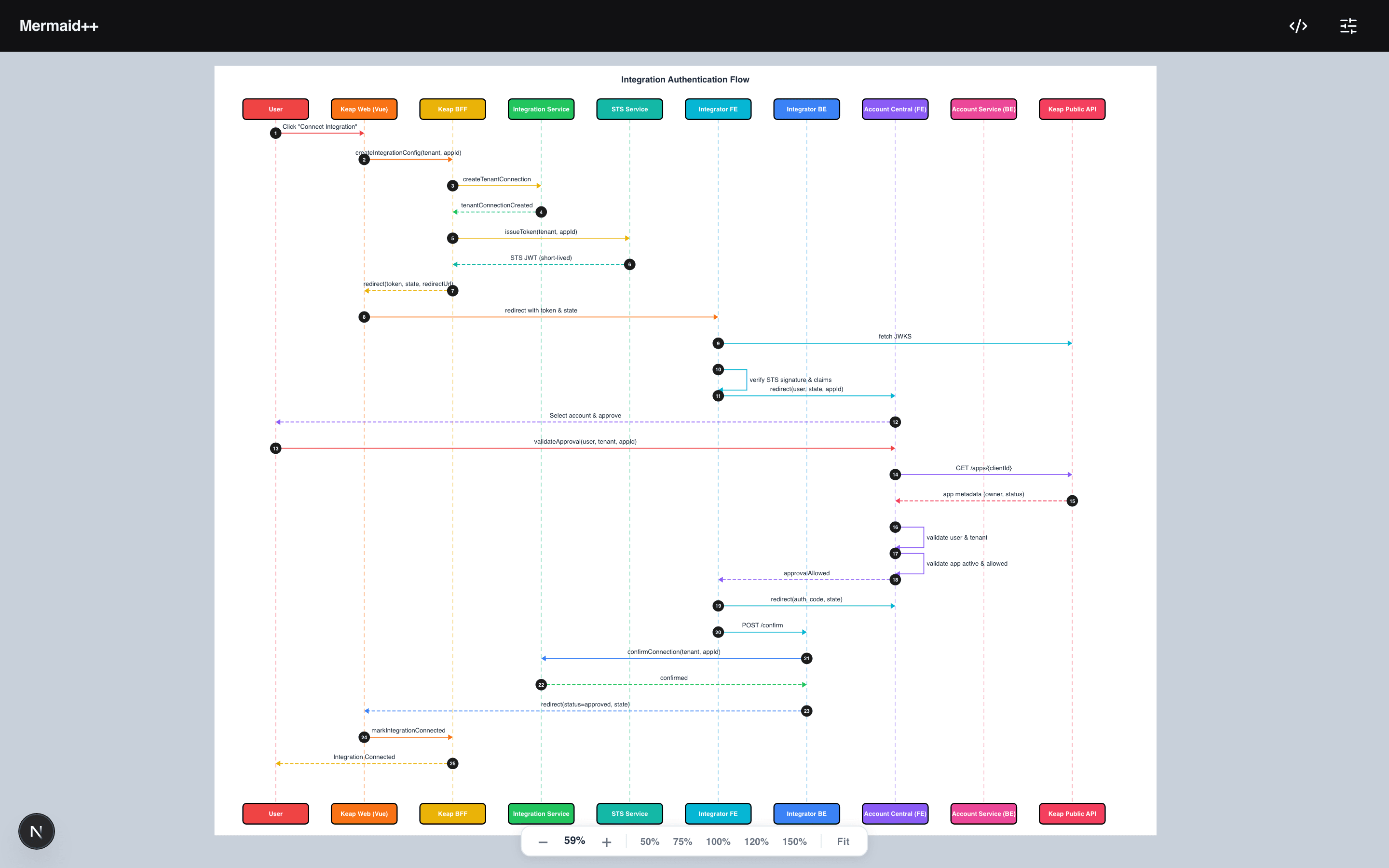
Mermaid is a great spec format. The default renderer is not a great renderer. Mermaid++ keeps the syntax, replaces the output, and adds the editing experience Mermaid should have shipped with.
What It Is
Mermaid++ is a supercharged Mermaid diagram editor that supports all 14+ diagram types — flowchart, sequence, class, ER, Gantt, pie, git, mindmap, timeline, and more — with a custom sequence diagram renderer that produces significantly more polished output than Mermaid's default. The auto-detection means you never configure the diagram type; you just start typing and the editor figures it out from your first line.
Key Features
Custom sequence diagram renderer. This is the headline feature. Instead of Mermaid's default sequence output, Mermaid++ draws lifelines with a 12-color palette, renders message labels as pill-shaped badges, and auto-guesses participant icons based on their names. A participant named server, database, api, cache, webhook, or bot gets the right icon automatically. The result looks like a diagram a designer made, not something generated by a parser.
14+ diagram types auto-detected. Paste a block starting with sequenceDiagram, flowchart LR, classDiagram, gitGraph, or any other valid Mermaid header and the editor switches renderer immediately. No dropdown, no configuration.
Pan and zoom that feels native. Ctrl+Scroll zooms to the cursor position — not the canvas center, to the cursor. Double-click zooms 1.5x. Press F or Cmd+0 to fit. Pinch-to-zoom works on mobile. These aren't afterthoughts; they're the primary interaction model.
Sequence diagram toggles and sliders. A settings panel exposes five toggles (Lines, Numbers, Text Pill, Icons, Big Numbers) and four layout sliders (step height, participant width, gap, font size). The Icon Editor lets you override the auto-guessed icon for any participant from a set of 25+ options.
Three themes, three export formats. Dark, Light, and Monokai. Export PNG at 2x retina, raw Mermaid code, or JSON. All state persists to localStorage.
Confetti. Paste a sequence diagram with two or more participants and a confetti burst fires. It's the kind of small detail that makes a tool feel alive rather than utilitarian.
Under the Hood
The stack is Next.js 15, React 19, mermaid.js 11, and Turbopack. The architecture is a split render path: for sequence diagrams, the Mermaid parser is used only for tokenizing — the actual SVG output comes from the custom renderer. For all other diagram types, mermaid.js runs normally but gets the 12-color palette injected via CSS custom properties.
The icon auto-detection is a string-match dictionary on participant names, normalized to lowercase before matching. The participant width slider feeds directly into the SVG layout calculation — participant boxes, lifeline x-positions, and message arrow endpoints are all recomputed on slider change via a useMemo that depends on the layout settings object.
Mobile gets a full-screen editor overlay and a bottom-sheet settings drawer — separate layout logic from desktop, not a scaled-down version.
Try It
Paste a sequence diagram with participants named User, API, and Database. Watch the icons appear. Then pull the step height slider and see how the layout responds live.
Comments
Be the first to leave a comment.
Related Posts