Score Card
Bunlong Heng
March 24, 2026
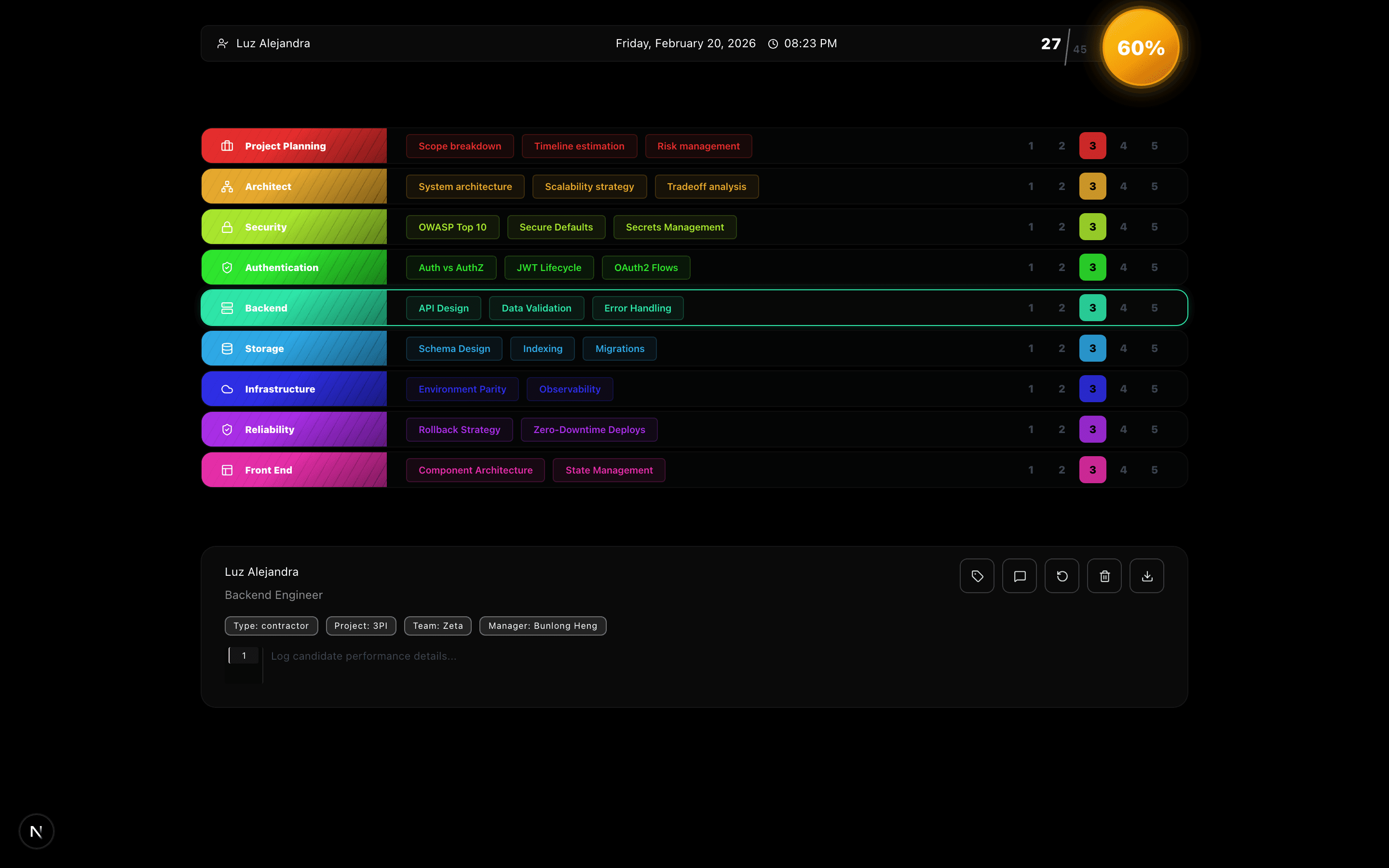
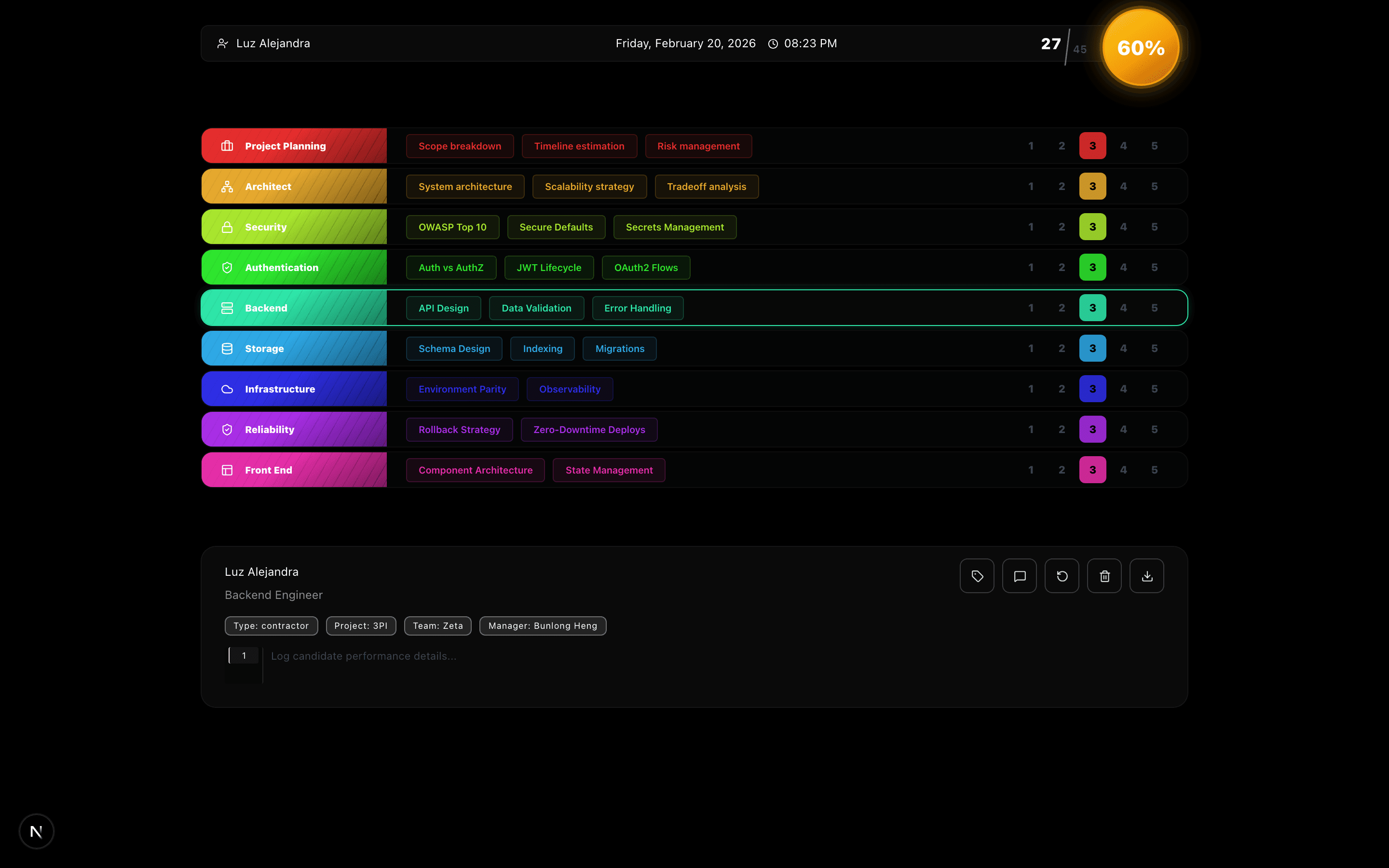
Most interview scorecards are a Google Form in disguise. Score Card is a structured, rubric-driven assessment tool with topic-level Q&A, AI-generated feedback, a 60-second per-topic timer, and a polished PNG export.
What It Is
Score Card is a browser-based technical interview scoring tool built around a specific rubric: six categories (Auth, Frontend, Backend, Databases, DevOps, Leadership), each broken into three or more topics. Every topic has a curated interview question, an expected answer, five strong signals to listen for, and five red flags to watch for. The scoring is deliberate — 1 through 5 per category, color-coded, with the full picture exportable as a PNG when the interview is done.
Key Features
Rubric-driven topic modals. Click any topic name and a modal opens with the full interview question, the expected answer, and the signal/red-flag breakdown. This is what separates Score Card from a generic rating form — every score is anchored to specific, documented criteria. You're not rating a feeling; you're rating against a checklist.
Know / Don't Know badges with confetti. Toggle a topic as "Know" and a heart-shaped confetti burst fires. It's a small reward mechanic that makes the assessment feel less clinical and keeps the interviewer engaged across a long session.
60-second topic timer. Each topic gets a play/pause/reset timer. The intent is to keep responses time-boxed during the interview — a discipline that most interviewing teams claim to have and most don't enforce.
1–5 sliders, color-coded by performance band. Below 60% the category header goes red. 60–80% is yellow. Above 80% is green. The visual feedback is immediate and legible across all six categories at a glance.
AI feedback via Claude. The "Generate Feedback" button assembles a structured prompt from the category scores and topic signals. The output is a one-paragraph recruiter summary — no raw numeric scores, just plain-English assessment language.
Candidate tags with flag emojis. Attach metadata to a candidate: recruiter name, interview type, location, country (🇧🇷 🇩🇴 🇨🇷 🇨🇴 🇲🇽), project, and team. This context travels with the PNG export.
Row texture overlays and audio feedback. Four row textures (stripes, crosshatch, carbon, veil) are purely cosmetic but make the card look designed rather than default. The Web Audio API powers procedural sound — every click, hover, and success event has a distinct synthesized tone. No audio files, no CDN dependency.
PNG export via html2canvas. One button captures the full scorecard — tags, scores, notes, textures — at full resolution.
Under the Hood
Score Card runs on Next.js 15, React 19, TypeScript, and Tailwind. The Anthropic SDK is included but used only to construct the prompt string — the actual Claude call is made by the user in their own interface, which keeps API keys out of the app entirely.
Audio is generated via the Web Audio API's OscillatorNode and GainNode — each event type has a different waveform (sine, square, triangle), frequency, and envelope. The ripple effect is a div absolutely positioned at click coordinates, animated via a CSS keyframe, and removed from the DOM after it completes.
All state — scores, tags, notes, timer positions, texture selection — persists to localStorage under a keyed namespace so a page refresh doesn't lose a partially completed interview.
Try It
Run through a mock Backend category. Click the "Database" topic to see what a real interview question with signal criteria looks like. Timer the response. Export the card.
Comments
Be the first to leave a comment.
Related Posts